Features Solutions Pricing Resources About BNI Contact
Log in Start Free
Features / Invoicing & Debt Chasing

Get paid faster with smarter invoicing

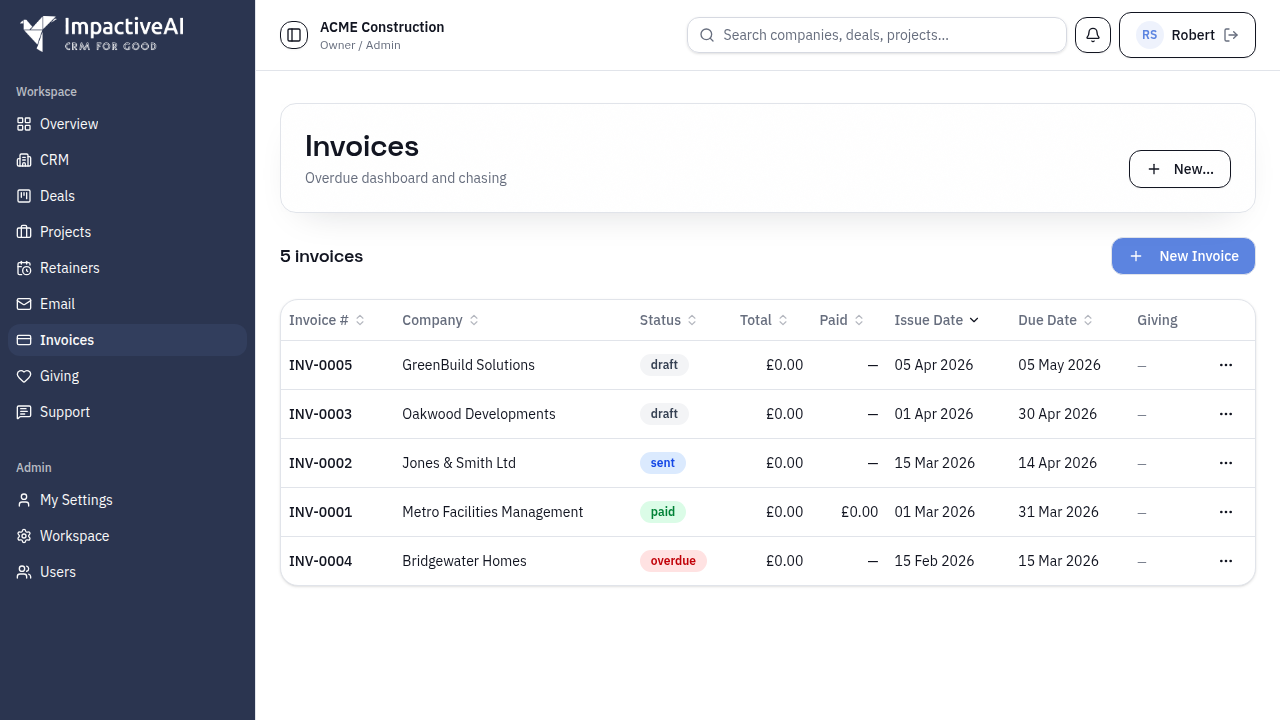
Create invoices with line items, push and pull to Xero with two-way sync, track payment status, and manage overdue invoices. Auto-incrementing invoice numbers and configurable payment terms.

Start Free Book a Demo

What you get

Full invoice creation with line items and tax
Two-way Xero sync — push invoices, pull payments
Auto-incrementing invoice numbers with configurable prefix
Payment status tracking (Draft, Sent, Paid, Overdue)
Configurable payment terms and due dates
Invoice-to-deal and invoice-to-contact linking
Currency support for international clients
Xero contact lookup and import during invoice creation
Invoicing & Debt Chasing screenshot

How it works

Get up and running in minutes, not days.

1

Create invoices

Build invoices with line items, set payment terms, and link to contacts and deals. Numbers auto-increment with your custom prefix.

2

Sync with Xero

Push invoices to Xero with one click. Payments sync back automatically every 15 minutes.

3

Track and chase

See payment status at a glance. Overdue invoices are flagged automatically. When paid, the Giving Engine activates.

Frequently asked questions

No — invoicing works standalone. Xero integration is optional and adds two-way sync for invoices and payments.
Push invoices to Xero and payments sync back automatically. A 15-minute auto-sync with 30-day lookback ensures nothing is missed.
Yes — when an invoice is marked paid (or payment syncs from Xero), the Giving Engine automatically allocates a percentage to charitable giving.

See how Invoicing & Debt Chasing fits your business

Explore solutions tailored to your industry or use case.

Credit Control For Finance Brokers

Related features

Ready to try Invoicing & Debt Chasing?

Start free today — no credit card required. Set up in under 5 minutes.
Start Free View Pricing